请求去重
相同的提示词按键合并。在这次运行中,12 个请求变成了 3 次模型调用;9 个重复请求由去重缓存应答,总共耗时 0.3 ms。
enhanced::Deduplicator
Rust crate · Tokio · MIT
重复的提示词共享同一次模型调用。服务商出故障时熔断器跳闸,请求快速失败,而不是越积越多。流水线丢弃的每个请求都会进入死信队列,你可以查看并重放。支持 Anthropic、OpenAI、llama.cpp、vLLM 或你自己的后端。
cargo run --example llm_pipeline4 个用户发出 12 个请求,问了 3 个问题;随后在模拟的服务商故障期间又来了 8 个。每个圆点代表一个请求,每个时间戳都来自录制的那次运行,以五分之一速度播放。

来源:llm_pipeline_trace.json,由 cargo run --example llm_pipeline 使用内置模拟模型(每次调用 300 ms)生成,debug 构建,Windows x86_64。
相同的提示词按键合并。在这次运行中,12 个请求变成了 3 次模型调用;9 个重复请求由去重缓存应答,总共耗时 0.3 ms。
enhanced::Deduplicator
包裹第 3 阶段的每次 worker 调用。5 次失败后熔断器打开,后续请求直接被拒绝,不会打到服务商。60 s 后再次探测。
enhanced::CircuitBreaker
不会有请求被悄悄丢掉。通道已满、超时、截止时间已过、失败和熔断拒绝,都会连同原因进入一个 1000 条的环形缓冲区。
handles.dlq.drain()
五个 Tokio 任务通过有界通道相连(512, 512, 512, 1024, 512, 256)。模型变慢时,生产者会等待或丢弃请求,所以高负载下内存依然平稳。
spawn_pipeline(worker)
这个示例约 200 行,很适合作为接入自己后端的模板。设置 PROVIDER=anthropic 或 PROVIDER=openai 并提供 key,就能对真实模型发出同样的 3 次调用;故障是在服务商前面模拟的,所以不会产生费用。
容错能力集中在第 3 阶段:在你的 ModelWorker 外层做截止时间检查、熔断和超时。去重、重试、缓存、限流和负载均衡都是构建模块,由你包在 worker 外面,正如示例中对 Deduplicator 的用法。

克隆并运行示例。无需 key,无需联网。
git clone https://gitlab.com/mattbusel/tokio-prompt-orchestrator
cd tokio-prompt-orchestrator
cargo run --example llm_pipeline
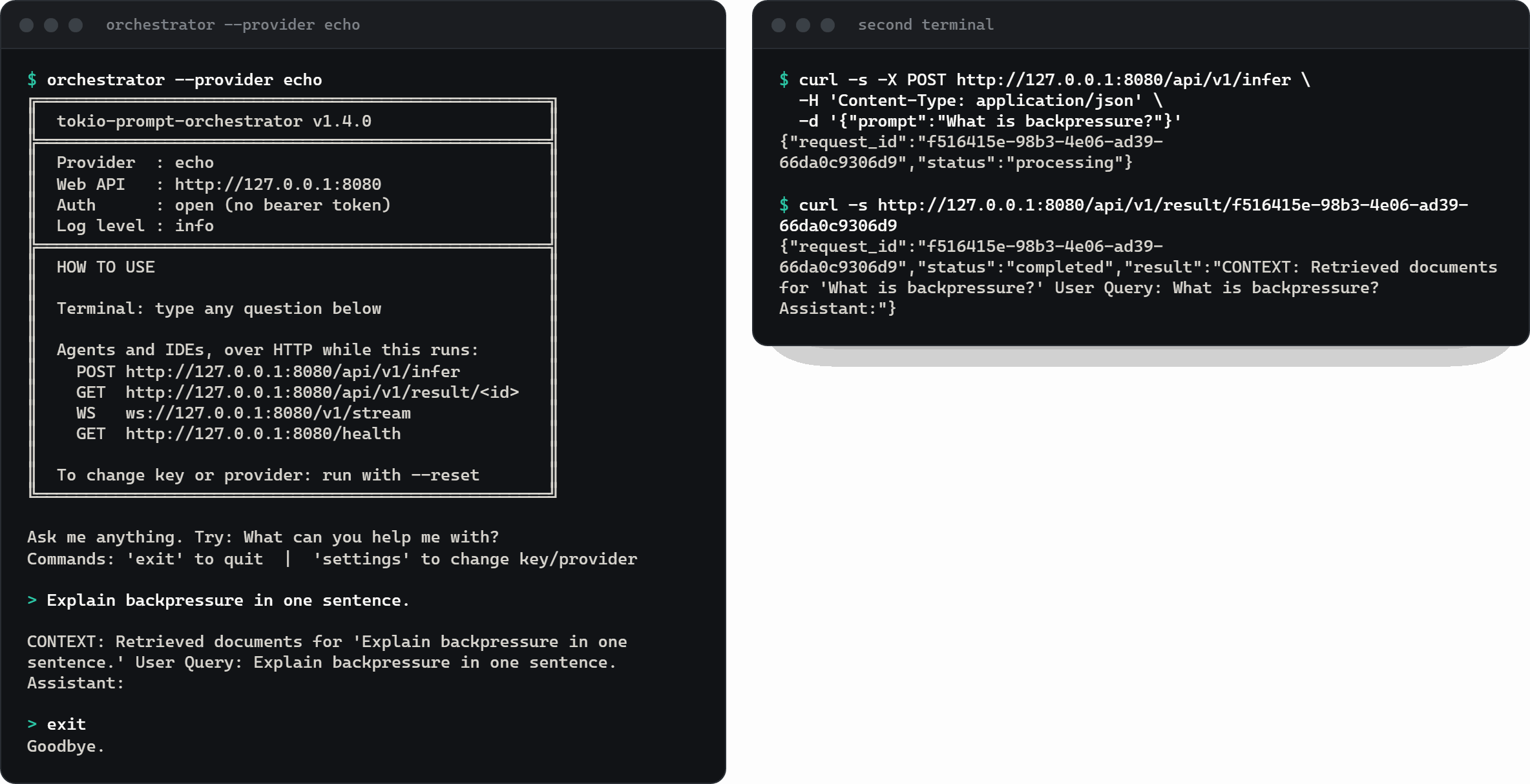
交互式终端,外加 8080 端口上的 HTTP API。echo 无需 key。Windows(一行 PowerShell 命令)、Homebrew、Scoop 和 cargo binstall:见 下载。
curl -fsSL https://gitlab.com/mattbusel/tokio-prompt-orchestrator/-/raw/main/install.sh | sh
orchestrator --provider echo

# then, from another terminal
curl -s -X POST http://127.0.0.1:8080/api/v1/infer \
  -H 'Content-Type: application/json' \
-d '{"prompt":"What is backpressure?"}'把 EchoWorker 换成 AnthropicWorker、OpenAiWorker、LlamaCppWorker 或 VllmWorker。
[dependencies]
tokio-prompt-orchestrator = "1.4"
tokio = { version = "1", features = ["rt-multi-thread", "macros"] }use std::{collections::HashMap, sync::Arc}; use tokio_prompt_orchestrator::{spawn_pipeline, EchoWorker, ModelWorker, PromptRequest, SessionId}; #[tokio::main] async fn main() -> Result<(), Box<dyn std::error::Error>> { let worker: Arc<dyn ModelWorker> = Arc::new(EchoWorker::new()); let handles = spawn_pipeline(worker); let mut output = handles.take_output_rx().await.ok_or("output taken")?; handles.input_tx.send(PromptRequest { session: SessionId::new("demo"), request_id: "req-1".into(), input: "Hello, pipeline!".into(), meta: HashMap::new(), deadline: None, }).await?; if let Some(out) = output.recv().await { println!("{}", out.text); } for dropped in handles.dlq.drain() { println!("dropped {}: {}", dropped.request_id, dropped.reason); } Ok(()) }
orchestrator 二进制同时运行终端提示符,以及 REST、SSE 和 WebSocket API。提交提示词拿到请求 id,再获取结果;/health 会报告熔断器状态和队列深度。
Claude Desktop 和 Claude Code 通过独立的 mcp 二进制经 stdio 连接:MCP 配置
Windows:下载 .exe 后双击运行;在设置中选择 echo,无需 key 即可试用。
按模型的滑动窗口加令牌桶。限制为每分钟 10 个请求时的真实输出:
req-01 ok
...
req-10 ok
req-11 throttled: sliding window limit exceeded; window resets in 60001 ms
req-12 throttled: sliding window limit exceeded; window resets in 60001 ms
rate_limiter::RateLimiterRegistry
Anthropic、OpenAI、llama.cpp 和 vLLM 的 worker,离线的 EchoWorker,以及用于轮询或最小负载池的 LoadBalancedWorker。其他后端只需实现一个 async trait。
trait ModelWorker
在 Ratatui TUI 中显示队列深度、熔断器状态、去重节省量和日志面板。自带模拟数据模式,不运行流水线也能先看看。
cargo run --bin tui --features tui
通过 feature flag 可加入 Prometheus 指标、OpenTelemetry 链路追踪、基于 Redis 的分布式去重、提示词模板、A/B 测试和自调优控制回路。默认构建不含任何可选依赖。
--features full
数据来自 BENCHMARKS.md 中最近一次记录的运行(Windows,x86_64,EchoWorker,因此不含网络和模型耗时)。
| 测量项 | p50 |
|---|---|
| 限流检查 | 110 ns |
send_with_shed (带丢弃的非阻塞发送) | 204 ns |
| 熔断器检查(闭合状态) | ~0.4 µs |
| 去重检查(已缓存) | ~1.5 µs |
| 100 个相同的并发提示词,开启去重,只推理一次 | 共 52.6 µs |
1000 次并发 EchoWorker 调用 | 共 7.1 ms |